ADDIE Rewired, Phase 2: Design
Part two of a five-part series on where AI actually fits in the process you already use. This is also Chapter 2 of the ebook.
In Analysis, you figured out the problem. You learned who the learners are, what they are struggling with, and what "fixed" would look like. You wrote it all down. That is your starting point.
Design is the next step. This is where you decide what the course will actually teach and how it will be built. Think of Analysis as the diagnosis and Design as the treatment plan.
When people new to this try to use AI in Design, they almost always jump straight to the storyboard. A storyboard is the screen-by-screen plan for the course, the document that says what shows up on each slide. They have AI write the on-screen text and lay out the screens, and it feels like progress.
Here is the catch. The storyboard is the last thing you make in Design, not the first. By the time you are filling it in, the big decisions are already done. What are the learning goals? What order do you teach things in? How will you check that people learned? If those are wrong, a faster storyboard just helps you build the wrong course faster.
The real hours in Design do not go into laying out slides. They go into the planning. Writing the goals, putting them in order, and making sure your quiz actually tests what you taught. That work is part thinking and part paperwork. The thinking is yours. The paperwork is what AI is good at speeding up.
Here is the full breakdown: what stays human, what AI handles, the tools to use, and how this holds up at scale.
What stays human
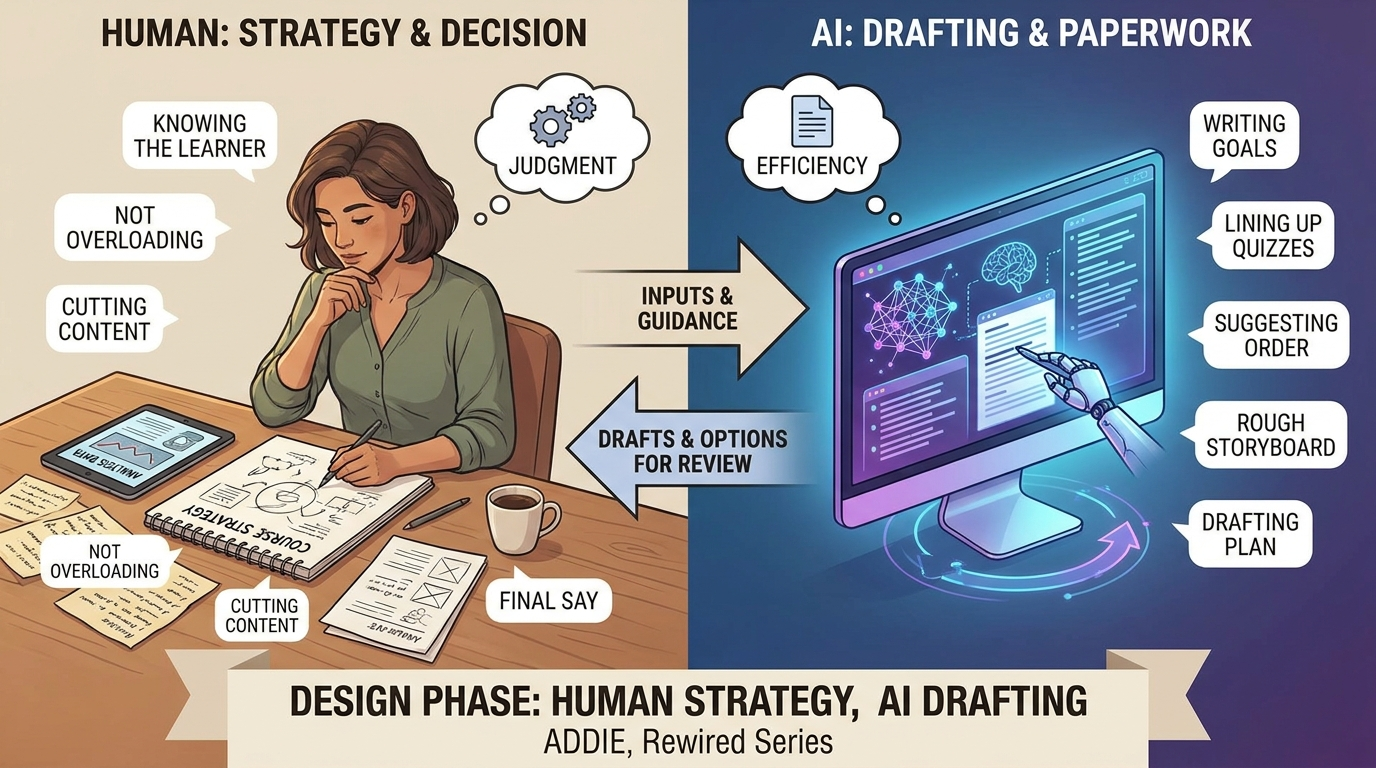
- The strategy stays human. Strategy just means your plan for how to teach this, for these learners, in their real situation. AI can hand you choices. It cannot decide which one is right. That is your job.
- Knowing the learner stays human. You sat in the meetings. You read what people said in Analysis. You know the pressure they are under and the gap between what they say they need and what they really need. AI was not in the room.
- Not overloading people stays human. There is only so much a person can take in at once. You decide what to put on the screen, what to leave off, and how to break a big topic into smaller pieces so it sticks. AI cannot feel when a screen is too busy. You can.
- Cutting stays human. This one matters. AI always gives you more. More goals, more content, more slides. Your job is often to take things away. Deciding what does not make the cut is a real design skill, and it stays with you.
What AI handles
- Writing the learning goals. A learning goal is a clear statement of what the learner will be able to do by the end. Give AI your Analysis notes and ask it to draft these goals for you. You are not starting from a blank page. You are fixing up a first draft that is already based on your own findings.
- Lining up goals with quizzes. Here is a simple check that often gets skipped because it is boring. Every goal should have a question or task that proves the learner met it. And every question should connect back to a goal. Ask AI to put this in a simple table: goal, how you will test it, what content teaches it. Now you can see the gaps at a glance. Nothing gets taught that never gets tested. Nothing gets tested that you never taught.
- Suggesting the order. Ask AI for two or three ways to order the lessons, not just one. AI is fast at laying out options. You look them over, pick the one that makes sense, and move on. That beats staring at a blank outline.
- Building the rough storyboard. Once your goals and order are set, AI can sketch out each screen for you. Not the finished words. Just the frame you drop your real teaching into.
- Drafting the plan document. All the pieces above add up to your design plan. Have AI pull them together into one document, then you shape it. The paperwork that used to take a full day gets drafted in an afternoon.
The tools to use
You do not need a fancy setup. Keep it simple and stay in charge of your own files.
For writing goals, use an AI chat tool like ChatGPT or Claude, and feed it your Analysis notes. The better your notes, the better the goals. If you put in junk, you get junk back.
For the goal-and-quiz table, take what the AI gives you and paste it into a spreadsheet you control. You want to be able to sort it and mark the gaps yourself.
For the order and the rough storyboard, let AI draft, then move the result into your own storyboard template, the one you already use to build the course.
That is the one rule for all of it. AI drafts into your format. You never bend your process to match its format. The moment you start working the way the tool wants, you have given away the part of the job that was supposed to stay yours.
At scale
One short module is easy to plan by hand. A big course is where a good workflow really pays off.
At that size, you do not make a separate plan for every module from scratch. You make one plan and reuse it. One set of goals, drafted fast and checked by you. One storyboard template, used again and again. The same goal-and-quiz table for every module, in the same shape, so anyone reviewing it reads each module the same way.
This is where the time savings get real. Writing goals and tests for a full course by hand is days of work, and it is the kind of work that gets rushed when a deadline is close. With AI drafting and you reviewing, it is hours. You still make every call. The difference is you spend your time deciding instead of typing.
That is the whole point. You are not making prettier slides faster. You are making the right decisions in the right order, with the paperwork handled, so the build that comes next is clean.
Design is decision work. The slides are just where those decisions show up.
With the plan finished, building the course stops being a guessing game and becomes simple execution. That is Phase 3.
*ADDIE, Rewired: A five-part series on where AI actually fits in the process you already use.*