ADDIE Rewired: Driving the Analysis Phase with AI
Most instructional designers only use AI during the development phase to write scripts or quiz questions. But starting there means skipping three critical phases where AI can actually handle your heaviest administrative workload. This post marks the launch of ADDIE Rewired, a five-part series exploring how to use AI as a workflow automation engine rather than just a generic content writer. We are kicking things off with the Analysis phase, looking at what AI can handle, what must remain strictly human, and how to use it to eliminate the documentation lag that kills project budgets.
Most instructional designers use AI the same way. They open a blank document, paste in some context, and ask it to write the content. They use it for scripts, quiz questions, and module copy.
That is development, which is the fourth phase of the ADDIE framework.
Starting there means you skipped three phases where AI can do real work. It also means you are still doing the hardest, most time-consuming parts of those phases by hand.
This is the first post in a five-part series based on a simple premise: AI works in every phase of ADDIE, not just the one where content gets written. This post covers the analysis phase. We will look at what AI can handle, what it cannot, and how a real production system uses it to scope a 16-module curriculum without drowning in documentation.
Why Analysis Gets Skipped
Experienced instructional designers know analysis matters. That is not the problem.
The problem is time. A client gives you a two-week runway. Half of it goes to project setup, SME coordination, and getting sign-off on scope. By the time you could run a proper needs assessment, the client is already asking when development starts.
So you make your best assumptions, document what you can, and move forward. That is not a failure of instructional design thinking. That is a resource constraint.
AI does not solve the strategic part of analysis. It cannot interview a stakeholder, read the political dynamics in a room, or decide whether training is even the right answer. Those stay with you.
What AI solves is the documentation lag, which is the time between having the information and turning it into something usable. That is where analysis budgets disappear.
AI generates the interview guide before the first call. It synthesizes notes the same day you collect them. It drafts the gap analysis while you are still in the debrief. You still make every decision, but the paperwork that used to take two days now takes two hours.
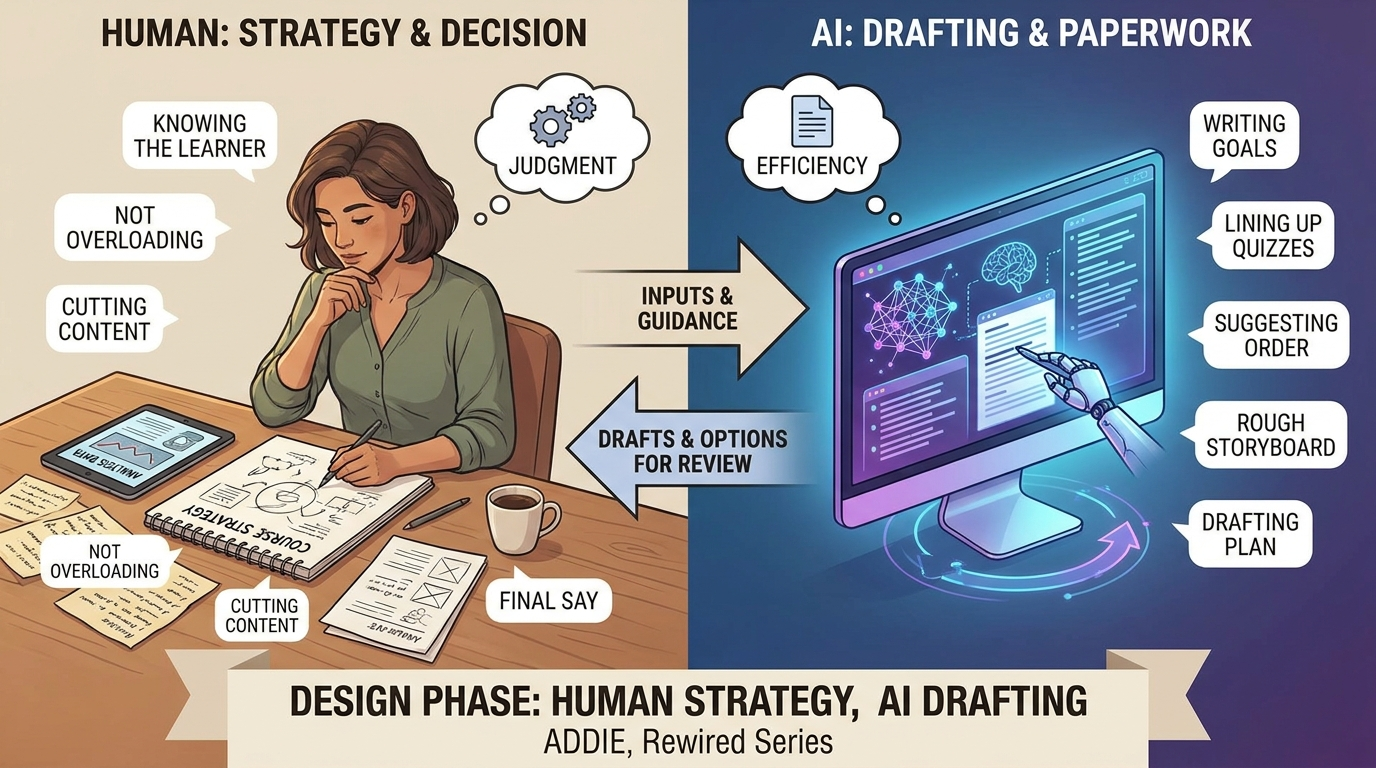
What Stays Human vs. What AI Handles
Before applying any tool, you need a clear line between judgment work and documentation work. These are not the same.
This stays with you:
- Root cause diagnosis: Deciding if this is actually a training problem or a process issue.
- Stakeholder interviews: Reading the room, understanding internal politics, and knowing what people are not saying out loud.
- Observational research: Conducting site visits, job shadowing, and watching the work happen.
- Organizational context: Evaluating company history, culture, and past training failures.
- The final decision: Making the final go or no-go call on whether training is the right solution.
AI handles this:
- Drafting the interview guide from the brief, role context, and performance outcome.
- Tagging and organizing transcript notes after interviews.
- Mapping contradictions across multiple stakeholder responses.
- Building learner persona first drafts from role titles, experience levels, and tools used.
- Categorizing and documenting gap analysis findings.
- Flagging statements in interview data that suggest a non-training root cause.
- Writing the front-end analysis report shell.
The instructional designer still analyzes. AI just handles the documentation trail.
The Tools and How to Use Them
Every application below follows a simple workflow: you take your raw input, let AI build the initial scaffold, and then apply your professional judgment to the output.
Stakeholder Interview Guide
For stakeholder preparation, you can create a 12 to 15 question guide using Claude. Provide the performance outcome, stakeholder role, and business context. Use this as a starting point to get a usable draft in 10 minutes instead of 45, then adjust it for what you know about the person and the situation.
- Tool stack: Claude combined with a role description and the performance gap brief.
Interview Note Synthesis
For note synthesis, you can create a gap map by dropping raw interview notes into Claude. Ask it to identify recurring themes, flag contradictions between stakeholders, and surface any statements that suggest a non-training root cause. You do the judgment work while the AI handles the pattern matching.
Synthesizing notes across five stakeholder interviews used to take an afternoon. With AI, you get a structured draft in under 30 minutes that you can quickly refine and verify.
- Tool stack: Claude combined with Otter.ai transcripts or a Fireflies.ai export.
Learner Persona First Draft
For persona development, create a first-draft profile using Claude by providing the role title, experience level, tools the learner uses daily, and their organizational context. AI is incredibly fast at building the scaffold, leaving you free to add the nuance it cannot know from a job title. Always verify the results with actual learners before finalizing.
- Tool stack: Claude combined with a role title and experience context.
Task Analysis Scaffold
For SME preparation, create a draft task list organized by frequency and criticality using Claude and the job description. Bring that draft to the SME session instead of a blank document. Showing up with a structured draft changes the dynamic completely. SMEs spend their time correcting and refining instead of building from scratch, which gets you better information faster.
- Tool stack: Claude combined with a job description.
Gap Analysis Documentation
For gap documentation, create a categorized gap report using Claude and your analysis findings. The analysis is entirely yours, but the formatting is AI work. Claude organizes the information you already have into a structure that is useful for the design phase. It is not interpreting the data; it is just packaging it.
- Tool stack: Claude alone, or combined with Notion AI.
How This Works in a Real Production System
Here is what analysis looks like in a multi-module course build.
The project is a 16-module curriculum with one developer and a twelve-week timeline. Before a single slide gets built, analysis determines what gets built and in what sequence.
AI generates the initial task breakdown from the client brief. It drafts the stakeholder interview guide for every key role, including the sponsor, the SME, and the learner's manager. After each call, the transcript goes into Claude with a synthesis prompt. The output is a gap map organized by category, covering knowledge gaps, skill gaps, environment factors, and motivation factors.
Every decision about scope, sequence, and what gets cut stays with the instructional designer. What AI handles is the paper trail that would otherwise eat a week of calendar time.
By the time analysis closes, there is a documented gap map, a scope summary, and a content outline draft that feeds directly into design. None of that required starting from a blank document. It just required good judgment and a clear process. That is the difference between using AI as a content writer and using it as a workflow tool.
Where to Start This Week
Pick one task from your current analysis work and run it through AI before you do it manually.
If you have a stakeholder call coming up, generate the interview guide in Claude. Give it the performance outcome, the stakeholder's role, and the problem the client described. See what it produces in 10 minutes.
If you are in the middle of synthesizing notes, paste your raw notes into Claude and ask it to identify themes, flag contradictions, and surface any patterns that suggest a non-training root cause. Use the output as a first draft.
The goal is not to hand off analysis to AI. The goal is to stop spending two days on documentation work so you can spend that time on the decisions that actually require your expertise. That is what the rest of this series is about.